
The Sona platform brings every field system, whatever protocol it speaks, together on one automation server, runs the logic, the schedules, the trends, the reports and the visualization in the same software, and grows as Sona applications are installed on top of it: a platform for building and home automation.
One piece of software, one device
The platform has two layers. The software layer is the brains of the job: logic, schedules, visualization, data logging and applications all run here. The hardware layer is the body: an automation server that sits on the DIN rail in the electrical panel. The software comes installed inside the server; there is no PC to set up, no server to keep running and no separately licensed screen package. All the operator has on the desk is a browser. The maintenance side follows from that: with no computer to run, its installation, patching and running load disappears as well.

One platform, two products, any scale
Sona Home and Sona BMS are not separate systems; they are two products of the same platform, and both run the same automation software. Their screens come out of the same design tool and their applications install from the same store. What changes is the scale and the capability set the segment needs: the logic you build in an apartment behaves the same way on a campus. For the integrator that means one system to learn and carry into every project.
The detailed capability list for both products is on the Building Automation and Home Automation pages.

What comes out of the platform itself
Everything below comes out of the server itself; none of it needs separate software to install or a separate license to buy.
Multi-protocol server
Systems from different manufacturers meet in one device and enter a single data model.
Visualization you design yourself
Floor plans, device pages and dashboards are drawn for the project, not picked from a template.
Schedules
Work tied to the clock, the day and the calendar runs on the server.
Scenes
Many points are driven with one command, or in sequence.
Logic
Conditional behavior is built with a visual tool, and you write your own logic when you need to.
Trend logging
Consumption and sensor data is collected on the device and turned into graphs.
Reporting
Scheduled reports are produced and sent by email.
Managed from the browser
Both configuration and operation happen in the browser; nothing extra to install.
Touch panels
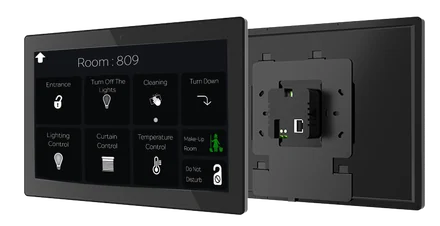
SonaHMI panels connect to the same server and show the same screen.
Mobile access
Access from the phone is free.
Voice assistants
Use with Siri, Google Assistant and Alexa.
Application store
When a new job is needed, an application is installed onto the server.
Alarm management
Every alarm is collected in one place and prioritized; it comes with the Alert Plus application.
Runs on site
Automation and data sit on the device; when the internet drops, the system carries on.
Data ownership
Records stay on the customer's own hardware and belong to the customer.
Backup and restore
The installation is backed up as a file and restored when needed.
Remote access
You connect to the server without driving to site.

Which systems connect
In a building, systems are installed without knowing about each other: lighting speaks one language, HVAC another, the meters a third. The server meets all of them on its own ground, some directly and some through a gateway. Devices from different manufacturers end up in the same scene, on the same screen and in the same report, and changing one system does not mean rebuilding the others.
- KNX
- BACnet
- Modbus
- MQTT
- SNMP
- HTTP/REST
- DMX512
- DALI gateway
- Zigbee gateway
- Z-Wave gateway
- M-Bus gateway
- EnOcean gateway
Device families and compatibility detail are on the Compatible Systems page.

You design the screen
Visualization is not locked into ready-made templates. You lay out the floor plans, device pages and dashboards yourself in a drag-and-drop editor, use your own logo, colors and icons, and hand the project over under your own brand. Three surfaces come out of the same design: the SCADA screen in a PC browser, the touch panel on the wall and the phone. They are not three systems; all three show the same data from the same server.

Logic, time and data in the same software
A building is not only controlled, it is operated. Schedules, scenes and conditional logic are built on the server, and you do not move to a second package to do it. The same software records consumption and sensor data, turns it into graphs and produces scheduled reports. The three things operations needs — the setup, the record and the report — are in one place.

Runs on site, reached from anywhere
The logic and the data sit on the server. When the internet drops, the automation keeps running: scenes execute, panels respond, logging continues. Remote access and notifications do need a connection, and mobile access is free. The line is clear: the automation running does not depend on connectivity; your looking at it from elsewhere does.

What happens after commissioning
A project starts when the server is commissioned: devices are defined, screens are designed, scenes are written. After that it is addition. When a new job is needed an application is installed; when the site outgrows one server, a second server joins the same screen. An update leaves the installed work and its data where they are. The installation itself is backed up as a file and restored when needed.

Sona Application Center
The platform's growth layer is Sona Application Center: an application store that runs on the server. When a job is needed, that job is installed onto the server as an application and runs inside the same screen. The Sona applications published in the store today cover alarm management, emergency lighting testing and DALI fault tracking, connection to a hotel system, multi-server site management, panel management and a music connection. The applications work in many languages. A license is granted to the device rather than to an application, and it has four tiers; you start with the free applications and open a higher tier as the need grows.
The application list, installation and license tiers are on the Applications page.

Server and panel, hardware of the same platform
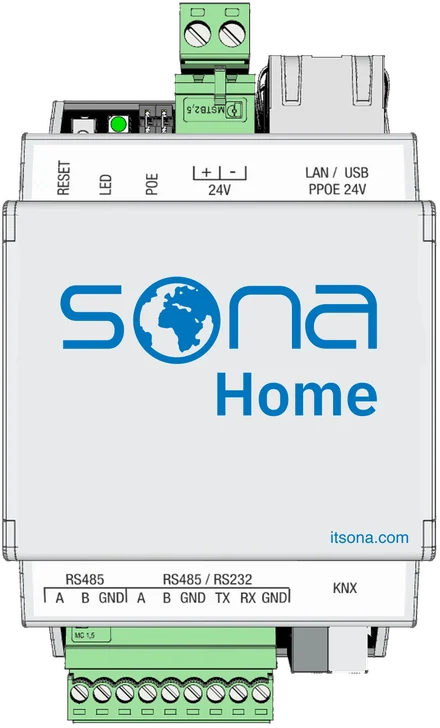
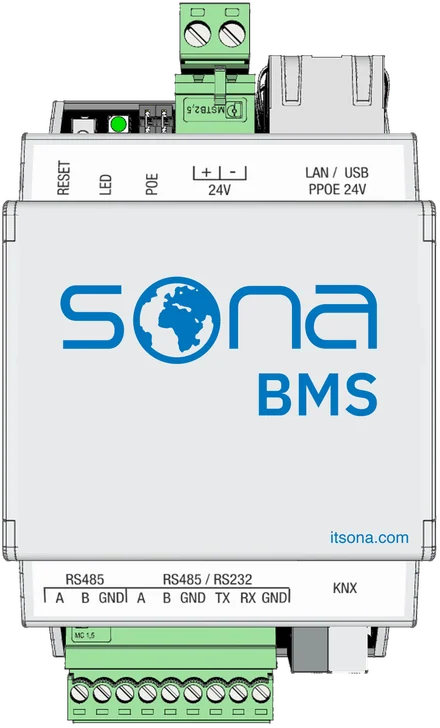
The platform comes with Sona hardware. Sona Home is used for residential projects and Sona BMS for commercial buildings. Where a screen is wanted on the wall, SonaHMI touch panels connect to the same server and show the same visualization, and all the panels are managed from one list. Because the software, the server and the panel come from one place, there is a single point of contact for all three.
Training and technical support behind it
Learning the platform is a one-time effort, not something you start over on every project. Our dealers receive training and technical support on commissioning, installing applications and troubleshooting. The team that develops the applications and the panel software and the team that provides support are in the same company; what comes in from the field goes to the people who build the product.

Where to go from here
- Pick your segment: Building Automation · Home Automation
- See whether your systems connect: Compatible Systems
- Read how the first installation goes: Getting Started
Become a Sona dealer.
Build your projects on a single platform. Training, technical support and the application catalog are open to our dealers.