
Sona BMS brings a building's mechanical and electrical systems together in a single device, takes both the server and the client role on every protocol it connects over, and runs its visualization, its alarms and its trends on itself: an automation server.

The building's systems on one server
In a building, systems are installed separately and do not know about each other. Sona BMS brings them onto one server. HVAC, lighting, energy monitoring and the water and heat meters arrive on the same screen. The generator, the uninterruptible power supply and the solar PV system are on that screen too. The fire alarm panel, the elevators, the server room environment and the security systems join the monitoring.

The protocol layer
The server handles the protocols itself; there is no extra converter in between.
- BACnet
- Modbus
- KNX
- MQTT
- SNMP
- HTTP/REST
- DMX512
- DALIgateway
- Zigbeegateway
- Z-Wavegateway
- M-Busgateway
- EnOceangateway
TCP and UDP over IP, RS-232 and RS-485 serial lines, infrared converters and relay and dry contact modules are used as well.

Both server and client
On the protocols it connects over, Sona BMS takes both the server and the client role. On the same protocol it both reads data and serves data. The side that reads and runs the field devices and the side that supplies data to the central building management system are the same device. On large sites it takes on the lighting automation and carries the result up to the central system.

The operations screen
The screen the operator looks at all day comes out of the server. Live values on the floor plan, the alarm list, the trend graph and the schedule are in the same interface. There is no software installed on a computer; the operator opens a browser. If the computer fails, the automation does not stop. Users are defined, and each user sees only the pages they are entitled to.

What comes in the box
Everything below comes with the device. There is no extra product to buy.
Monitoring and the operator surface
- Live visualization on the floor plan
- Drag-and-drop editor
- Desktop and mobile views from the same design
- Template management; a template change flows to every page that uses it
- Color, text and shape change according to state
- Interactive objects such as sliders, spinners and toggles
- Custom widgets and pop-up windows
- Embedded camera image
- PNG, GIF, JPG and SVG graphics support
- RGB and color temperature controlled together
- Delivered with your own logo, colors and icons
- Access from the browser; no client to install
- Full-screen kiosk mode
- Multilingual interface
Alarm management
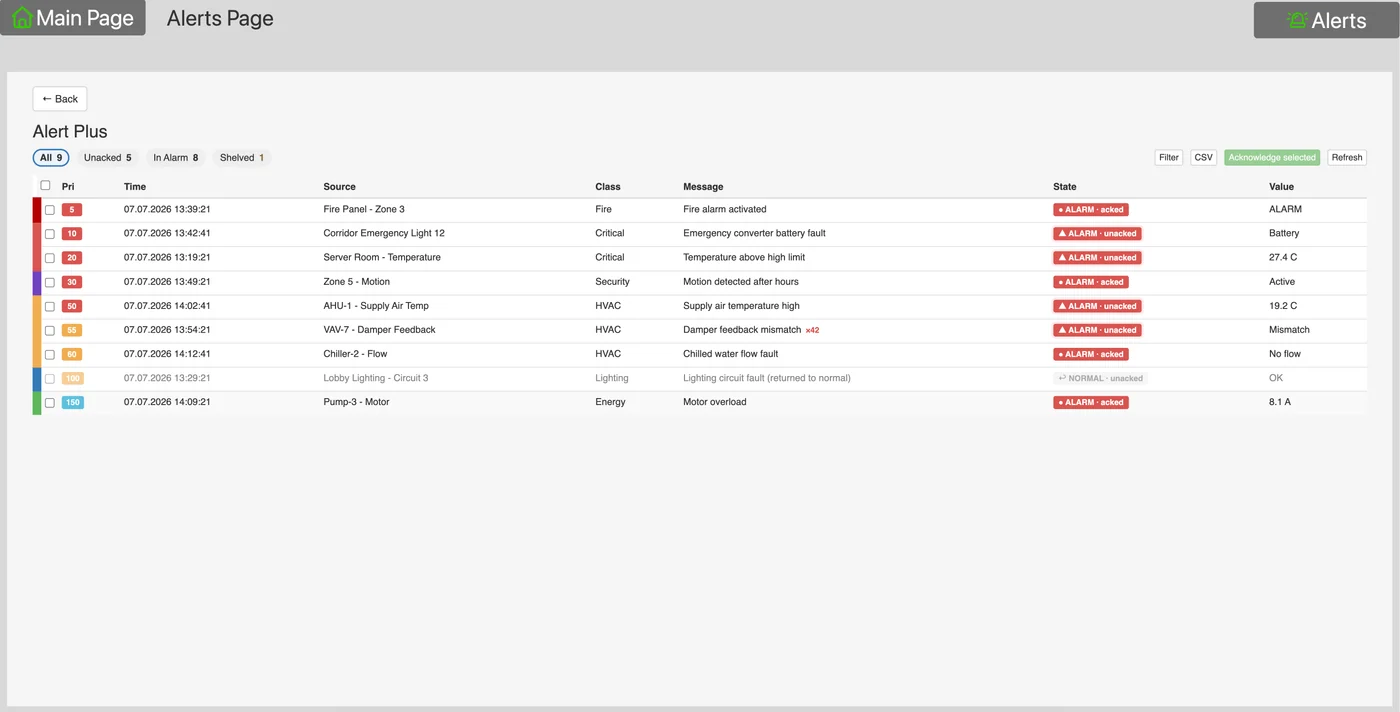
- Real-time alarm list
- The page comes to the front by itself when an alarm occurs
- Audible alert
- Acknowledgment and action trail
- Alarm history
- CSV download
- Sending to email and FTP
Data, trends and reporting
- Trend logging
- Multi-year retention
- Several trends compared on the same graph
- Daily, weekly and monthly views
- Excel and CSV export
- Scheduled automatic reports
- Archiving by email and FTP
Notifications
- Email; can send attachments
- Mobile notifications, Android and iOS
- SMS
- Telegram
- Built-in email server
Users and permissions
- Multi-user access
- Each user sees only the pages, trends and schedules they are entitled to
- The operator does not see the engineering interface
- A separate set of graphics per user
Automation and logic
- Four script types: event, resident, scheduled and start-up
- Block diagram editor; build logic without writing scripts
- Custom block design
- User libraries
- Central status functions: and, or, average, sum, maximum, minimum
- PID control
- Scenes and delays between commands
- The operator can save their own scenes
- Write-on-change to keep the bus load down
- Staircase timer and delay counters
- Short and long press, single and double press detection
- Blind controller
- RGB splitting and merging
Time
- Weekly schedules
- Holiday calendar
- Public holidays loaded automatically
- Schedules tied to sunrise and sunset, without internet
- The operator can change the schedule themselves
Remote access and service
- Remote connection without a static IP
- Mobile app
- KNX programming with ETS without going to site
- Remote service interface
System and operational continuity
- Backup and restore
- Scheduled automatic backup
- Remote software updates
- Project templating and duplication
- Role-based permissions
- Application store
Runs locally
- The system does not stop when the internet drops
- Data stays on the device
- No telemetry and no user data collected
Voice assistants
- Amazon Alexa
- Google Assistant
- Apple Siri and HomeKit
- Whatever is in the system reaches the voice assistant, whatever protocol it is connected over

BMS applications
Everything above comes with the device. When running a site calls for a more advanced version of one of them, that job is installed onto the server as an application.
Alarm center
Every alarm in the building is collected in one place. Alarm classes are defined, and each class gets its color, its sound and its acknowledgment rule. Priorities are set, escalation is configured, and email and mobile notifications go out. Every action is written to a record that cannot be altered afterwards. For shift handover the list is exported to a report.
Emergency lighting testing and reporting
The mandatory function and duration tests of emergency luminaires run on their own. Battery, lamp and driver faults are tracked luminaire by luminaire. The results turn into a report that meets the regulations and are sent by email. KNX DALI gateways from different manufacturers are managed side by side.
Connection to the hotel system
The hotel's front-desk system connects to the server. Each room is mapped to a KNX address. Check-in and check-out at the front desk apply directly to the room's automation. An empty room goes into saving mode, and an occupied room greets the guest ready.
Multi-server site management
When a site outgrows one server, each building gets its own. The screens of the remote buildings open inside the main server's screen. The operator does not log in again when switching buildings. Alarms are collected in one place as well.
The full list of applications is on the Applications page.
Where it is used
Retail store
Opening and closing scenes, zone-based constant light control, fan coil automation, load-based energy trends, emergency lighting checks.
Hotel
Room automation, connection to the front-desk system, do not disturb and housekeeping, concierge screen.
Hospital
Room comfort, connection to the nurse call system, notifications from the center to the room.
Office and meeting rooms
Occupancy display tied to the calendar system, lighting and climate scenes.
Server room
Temperature, humidity, flooding, uninterruptible power supply and network device monitoring.
Facility management
Work order generation, correcting setpoints that drift outside the operating range, monthly consumption reports.
Multi-site operations
The data from each site is carried to the center, with no static IP needed.

Sona BMS specifications
Sona BMS has no defined limit on the number of data points. Up to 10,000 points is the recommendation. A data point is every value monitored or controlled in the system. The number comes out of the site survey.
| Data points | No defined limit; up to 10,000 data points recommended |
|---|
| KNX/TP | 1 |
|---|---|
| Ethernet (RJ45) | 1 |
| RS-485 | 1 |
| RS-485 / RS-232 | 1 (software-selectable) |
| USB 2.0 | 1 |
| Supply | 24 V DC (terminal) |
|---|---|
| Consumption | 1 W (minimum, with no external load) |
| KNX bus | Bus terminal, 0.8 mm² |
|---|---|
| Power and I/O | Screw terminals, 0.8 – 1.5 mm² |
| LED 1 | Green: system load |
|---|---|
| LED 2 | Green: normal operation · red: reset |
| Mounting | DIN rail |
|---|---|
| Module width | 3 modules |
| Dimensions (W × H × D) | 54 × 112 × 61 mm |
| Protection class | IP20 |
| Net weight | 108 g |
| EMC | EN61000-6-1 · EN61000-6-3 |
|---|
| Operating temperature | 0 °C … +45 °C |
|---|---|
| Storage temperature | −15 °C … +55 °C |
| Relative humidity | 0% … 93% (non-condensing) |
| Warranty | 2 years |
|---|
When Sona Home instead
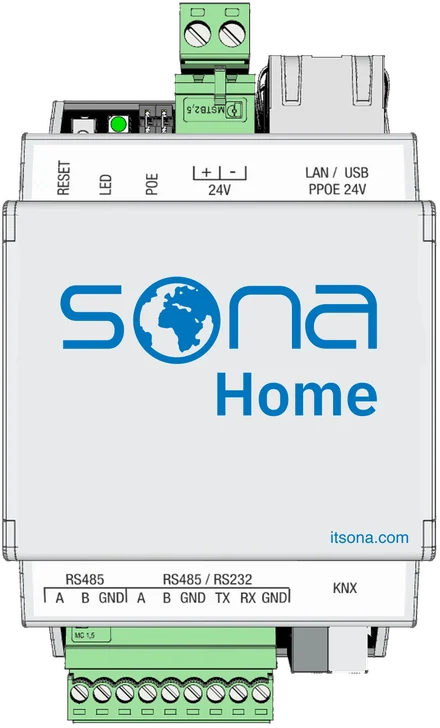
For homes and smaller projects, where the point count is below 3,500, Sona Home is enough. The two servers run the same software; the difference is the point capacity.
Datasheet
- Sona BMSDownload the datasheet PDF
Frequently asked questions
Does it connect to an existing building management system?
Yes. On the protocols it connects over, Sona BMS takes both the server and the client role; while it supplies data to the system above, it also reads and runs the field devices.
Do I also need to buy SCADA software?
No. The visualization is inside the device; there is no screen package installed on a computer and charged separately.
Is there an extra charge as the point count grows?
No. There is no per-point charge.
Does operation stop if the computer fails?
No. The logic and the data are on the server; the operator's computer is only a browser.
What happens if the site spreads across several buildings?
Each building gets a server and all of them are brought onto one screen. An application is used for this.
Can service be provided without going to site?
Yes. The server is reached remotely, and KNX programming with ETS is done remotely as well.
Become a Sona dealer.
Build your projects on a single platform. Training, technical support and the application catalog are open to our dealers.